When dental equipment creates, displays or transfers data, the buyer is purchasing more than hardware. The order may also depend on software versions, computer requirements, user accounts, export formats and an agreed support process. If those items are not documented before shipment, a device can pass a basic power-on test and still fail the intended clinic workflow.
This dental equipment data handover checklist helps clinic owners, distributors and procurement teams define what must be demonstrated and transferred with scanners, imaging devices, chairside cameras and displays. It is a buyer-side control document, not a claim that every product shares the same connections or software.
Start with a data-flow drawing
Draw the intended path from capture to review, storage and export. Name the physical device, workstation, software application, account owner and destination at every step. Use arrows to show transfers and mark any point that depends on a removable drive, cable, network folder, cloud service or manual re-entry.
A simple drawing should answer four questions: where data starts, what transforms it, where the working copy is stored and how an authorized user retrieves or exports it. This exercise also separates a product capability from a clinic-level integration assumption.

Define the handover package before ordering
Request the information while suppliers are still preparing the quotation. A late request can expose missing licenses, adapters or workstation assumptions after the equipment is already in transit.
| Handover item | What the buyer should record | Acceptance evidence |
|---|---|---|
| Product identity | Model, hardware revision, included accessories and serial-number format | Matches the approved order and packing list |
| Computer requirements | Supported operating systems, ports, minimum resources and required permissions | Tested on the intended clinic workstation |
| Software | Application name, version, installer source, license terms and update route | Installation and activation completed by the assigned party |
| Data formats | Native, import and export formats plus any limitations | Representative file opens at the agreed destination |
| User access | Account owner, administrator role, recovery method and offboarding process | Clinic controls the approved accounts |
| Support | Diagnostic information, escalation contact and responsibility boundaries | A sample support case can be described from start to closure |
Test the exact workstation and connection
A demonstration on a supplier-controlled computer does not prove readiness at the destination clinic. Record the workstation model or approved specification, operating system, available ports, display outputs and any network restrictions. Confirm whether installation needs administrator privileges and who is authorized to provide them.
If a mobile cart is part of the plan, check the route, wheel locks, cable management, power arrangement and access for service. The equipment should be reviewed with the physical requirements described in the dental chair installation and handover guide, particularly when power or data cables share the treatment-room layout.

Use a representative file for acceptance
The acceptance test should follow the agreed workflow using a non-sensitive representative file or supplier-provided test data. Confirm that an authorized user can create or import the file, attach the correct identifier, display it, save it to the intended location and export it in the agreed format. The goal is to verify the equipment pathway without using patient information for a procurement test.
Record the device, software and file versions used. Note any conversion step or manual naming rule. If an export depends on a paid module or external account, the order file should identify who supplies it and whether it is included.
Separate display capability from data integration
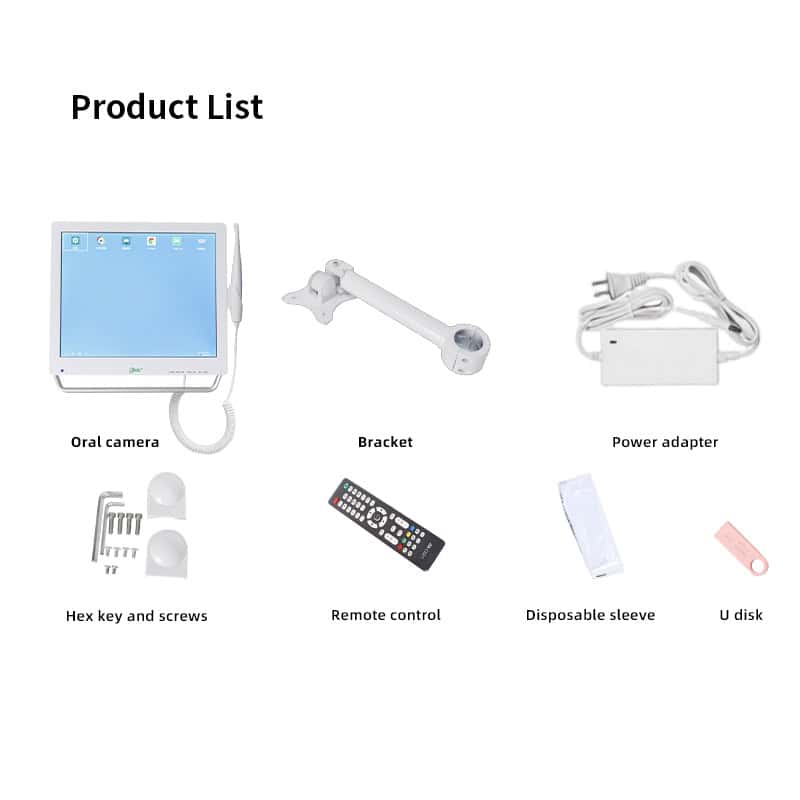
A chairside monitor may be able to display an image without receiving structured data from another system. Likewise, a camera can send video to a screen while storing files through a separate workstation. Ask for an interface drawing and identify each source, input, output, cable and mounting component.
RIXI Medical lists relevant equipment within its dental accessories range. Buyers should request the current specification for the exact model rather than assuming that a screen size or product photograph confirms compatibility.
Control accounts, updates and change notices
The receiving organization should know which account owns the software license, who has administrator access, how credentials are recovered and how a departing employee is removed. Do not place irreplaceable access under a temporary installer or distributor account.
Updates also need an owner. Ask how the supplier communicates supported-version changes, whether a workstation update can affect device operation, and what evidence should be collected before applying a major change. Keep installers, manuals and the last accepted configuration in a controlled location.
Set responsibility boundaries for support
A data-transfer fault can involve the device, cable, workstation, network, software or destination system. The handover should state which party checks each layer and what information is required for escalation. Photographs, error messages, log files, software versions and a description of the last successful step are usually more useful than a general statement that the system does not work.
Align these responsibilities with the wider operatory equipment compatibility record. For distributor projects, include a local first-response procedure and the supplier’s technical-support channel.
Receiving and final handover checklist
- The delivered model and included accessories match the approved order.
- The intended workstation and connection method are recorded.
- Installers, licenses and account ownership are transferred.
- A representative file completes the agreed path.
- Import and export formats are documented with limitations.
- Backup, update and access-recovery responsibilities are assigned.
- Support evidence and escalation contacts are available to the receiving team.
Scope note: This article provides general procurement and equipment-handover guidance. It does not establish clinical, cybersecurity, privacy or regulatory requirements. Requirements vary by jurisdiction and system; consult qualified local professionals and the current manufacturer documentation.
Frequently asked questions
Does a USB connection guarantee software compatibility?
No. The connector only describes part of the interface. Compatibility may also depend on drivers, supported operating systems, software versions, permissions and licensing.
Who should own the software account?
The purchasing organization should define an accountable owner and recovery process. Installer or distributor access can be provided as needed, but the clinic should not depend on an uncontrolled personal account.
What file should be used for acceptance testing?
Use non-sensitive representative data supplied or approved for testing. The file should exercise the agreed import, display, storage and export steps without exposing patient information.
When is a new acceptance test needed?
Repeat relevant tests after a hardware revision, software update, workstation replacement, operating-system change, new destination system or material change to the workflow.
Procurement teams can review the broader RIXI Medical equipment catalog or request model-specific manuals, connection details and a proposed handover list for supplier review.
Need Dental Equipment Pricing or Configuration Details?
Contact RIXI Medical for model comparison, distributor pricing, packaging information, OEM/ODM requirements and after-sales support.
Request Product Information