An intraoral scanner purchase can appear to be a single-device decision, yet the working package may also depend on a computer, cart, display, power arrangement, cables, software access and a defined path for moving files. If those elements are quoted separately, a clinic can receive equipment that powers on without having a clear, repeatable scanning workstation.
This guide helps clinic owners, procurement teams and distributors define an intraoral scanner equipment package before ordering. It focuses on configuration control and acceptance responsibilities. It does not replace model-specific instructions, local electrical review or the clinic’s own clinical and data-governance procedures. Buyers can start with the current RIXI dental intraoral scanner and compare the available mobile dental cart formats as reference points.
Map the intended workstation before comparing components
Begin with a simple workflow drawing. Identify where the scanner is stored, where it is used, which computer runs the approved software, where the operator sees the image, and where files are sent after capture. Add the power outlets, network connection, peripheral devices and parking position. This drawing exposes assumptions that a product list may hide.
For example, “computer included” does not explain its operating system, available ports, account ownership, update responsibility or whether the scanner supplier has approved that exact configuration. Likewise, “mobile cart” does not confirm that the cart can pass through the intended doorways, park without blocking access, or hold every approved component securely. Treat each statement as a question to document, not as an implied specification.
Freeze the package scope in one configuration sheet
A configuration sheet should separate supplier-provided items from clinic-provided items. It should use model names or revision identifiers wherever possible and show who approves a substitution. RIXI Medical, a dental equipment manufacturer and supplier based in Foshan, China, can coordinate product and sourcing information from the supply side; final installation, network, software and local compliance decisions still belong with the appropriately qualified parties in the destination market.
| Package element | Decision to record | Acceptance evidence |
|---|---|---|
| Scanner and accessories | Exact model, included tips or holders, cables and approved cleaning references | Packing list matched to the quotation |
| Computer and display | Required or supplied hardware, ports, operating system and mounting arrangement | Configuration record and successful start-up |
| Cart or workstation | Work surface, component positions, cable path, movement route and parking location | Photographs plus a movement check |
| Software and accounts | Installer, license owner, login custody, update method and support boundary | Access demonstrated to the named owner |
| Power and data | Plug type, connected loads, network method, export path and backup-power scope | Representative scan-to-export test |
The sheet should travel with the purchase order and receiving record. If a component changes, update the sheet before shipment rather than relying on an informal message that may not reach the installer or end user.
Match the cart and computer without assuming compatibility
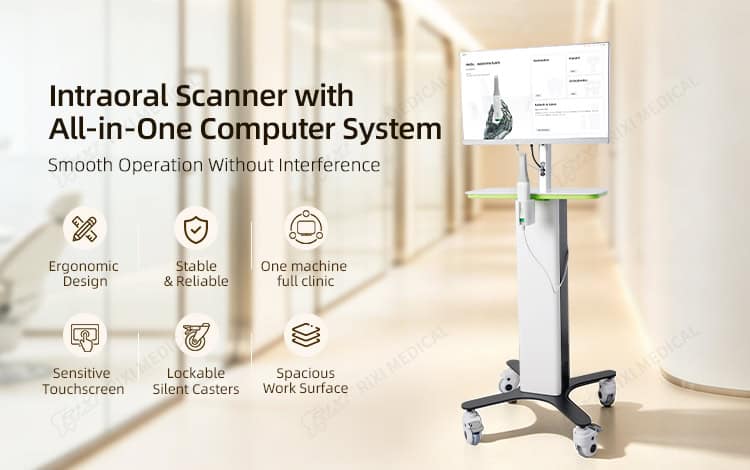
An all-in-one computer can simplify the physical layout, but the buyer still needs a model-specific interface check. Request the current computer requirements from the scanner supplier and compare them with the exact computer proposed. Record the available connection ports, display arrangement, cable lengths, ventilation clearance and access needed for service. Do not assume that a screen size or connector name proves compatibility.
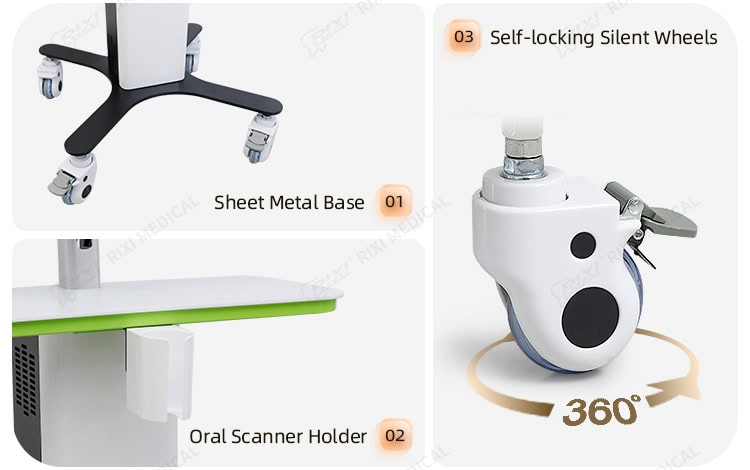
The cart should support the approved equipment without placing connectors under strain. Review where the scanner rests when not in use, how cables avoid caster paths and pinch points, and whether accessories can be stored without being mixed between rooms. The current intraoral scanner cart with an all-in-one computer illustrates one workstation format; exact computer, mounting and accessory specifications must be confirmed for the quoted revision.
If mobility and short-term power continuity are required, treat that as a separate decision. A scanner cart with UPS power backup may suit a different handover plan, but backup duration and connected loads cannot be assumed from the cart name. Use the dedicated UPS handover guide for load and transfer-test questions rather than folding them into a generic cart comparison.
Separate software, data and support responsibilities
A working hardware connection does not prove that software access, file transfer or support ownership is clear. Before shipment, identify who installs the application, who holds administrator credentials, which organization owns any license or cloud account, and how the clinic will regain access if a staff member changes. Requirements vary by model and software provider, so obtain current written instructions rather than copying a specification from another scanner.
Define one representative file path for acceptance: capture, review, save, export and transfer to the intended destination. Record the agreed file format and destination without assuming that every laboratory, practice-management system or network accepts the same method. For a broader checklist covering accounts, exports and version changes, use the dental equipment data handover guide.
Plan movement, power and service access together
Walk the real route from storage to use. Measure narrow doorways, thresholds, turns and lift access, then check the proposed cart dimensions against that route. Confirm a parking point with access to the required power and network connection. A cart that fits the operatory but cannot be parked or serviced cleanly is not a complete project solution.
Ask how technicians reach the computer mount, cable channels, casters and power components. Keep ventilation openings clear and document which panels may be opened by trained service personnel. The package record should also identify replaceable accessories and the contact path for model-specific parts information. Buyers who are still comparing cart architectures can use the broader mobile dental cart buying guide.
Run one representative acceptance sequence
Acceptance should test the configured package, not merely each box. Verify the packing list, inspect visible damage, position the equipment as approved, connect the documented cables, sign in with the named account, open the intended application and complete the agreed representative workflow. Then move and park the cart using the real route while observing cable control and component stability.
Record the exact hardware and software versions demonstrated, the people present, any deviations and the action owner. Retain photographs of the workstation, connection points and final cable layout. If a computer, scanner, cart, software version or major peripheral is later replaced, repeat the affected parts of the acceptance sequence.
- The quotation and received package use the same configuration identifiers.
- Supplier-provided and clinic-provided items are clearly separated.
- The scanner supplier has confirmed the proposed computer and interface requirements.
- Cart movement, parking, ventilation and service access have been checked.
- Software ownership, accounts, updates and support boundaries are documented.
- A representative capture-to-export sequence has been demonstrated and recorded.
Scope note: This is procurement and handover guidance, not clinical, IT-security or regulatory advice. Confirm the exact scanner, computer, software, cart and electrical specifications with the relevant suppliers, and have local qualified professionals review installation, network, privacy and jurisdiction-specific requirements.
Frequently asked questions
Is an all-in-one computer automatically compatible with an intraoral scanner?
No. Compatibility depends on the exact scanner, computer hardware, operating system, ports, software version and supplier requirements. Obtain written confirmation for the proposed configuration.
Should the cart and computer appear on the same purchase specification?
They can be separate line items, but one controlled configuration sheet should show how they fit together, who supplies each item and which substitutions require approval.
Does a mobile scanner package always need a UPS?
No. The need for backup power depends on the intended workflow, site power conditions and approved connected loads. If a UPS is included, document its scope and test method separately.
What evidence should a distributor keep for repeat orders?
Keep the approved configuration, revision identifiers, packing list, connection diagram, version record, acceptance result and photographs. Update the record when any component or software version changes.
For a model-specific configuration review, procurement teams may use RIXI Medical’s dental equipment buying guides and technical support enquiry route to request current specifications, drawings and package details before ordering.
Need Dental Equipment Pricing or Configuration Details?
Contact RIXI Medical for model comparison, distributor pricing, packaging information, OEM/ODM requirements and after-sales support.
Request Product Information