A dental intraoral camera can look complete in a product photograph and still arrive with unanswered questions about the monitor, handpiece, cables, accessories or image-handling path. Receiving inspection is the point where a clinic or distributor compares the delivered package with the approved quotation and records any difference before the equipment is placed into routine use.
This guide gives procurement teams a repeatable acceptance process for a monitor-based camera package. It uses RIXI Medical’s dental intraoral camera with a 17-inch monitor as a model-specific example, while keeping general inspection steps separate from specifications that must be confirmed for each order. Buyers reviewing other configurations can also browse the oral camera product category.
Start with the approved order baseline
Do not begin with a power-on test. Begin with the commercial and technical record that purchasing approved. Place the quotation, model confirmation, accessory list, artwork approval where applicable, packing list and any agreed connection notes beside the shipment. The receiving team needs one current baseline; a chain of emails with conflicting revisions is not a reliable acceptance document.
Record the model name, hardware revision if the supplier provides one, serial-number format, monitor size, camera-handpiece identity and all included accessories. If the quotation uses broad wording such as “oral camera set,” ask the supplier to reconcile that wording with the actual kit list. The goal is not to add requirements after shipment. It is to confirm that the delivered package matches what both parties approved.
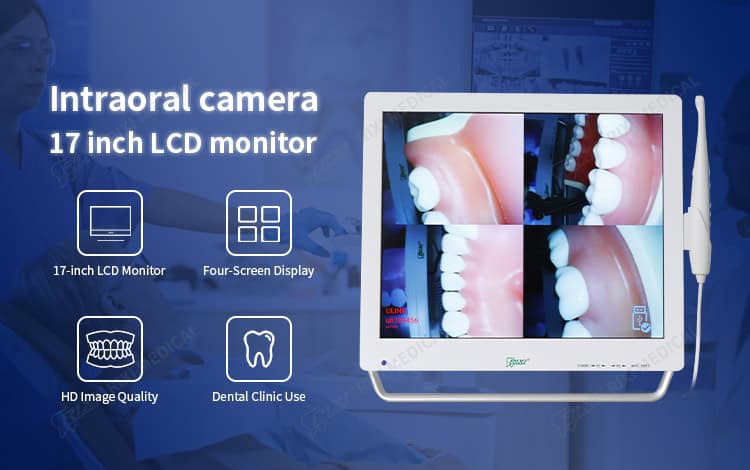
For the RIXI example, the current product page describes a 17-inch monitor, HD imaging and a four-screen display function. These are model-page statements, not assumptions for every oral camera. Confirm the exact supplied version and current specification sheet before accepting an order.
Inspect identity and condition before connecting power
Photograph the outer cartons before unpacking, especially any impact, moisture or resealing evidence. Then check product labels, carton labels and packing-list references against the order baseline. A matching product name is not enough when different cable sets, power supplies or regional variants may share a similar enclosure.
| Inspection point | What to compare | Evidence to retain |
|---|---|---|
| Product identity | Model, revision, serial number and carton labels | Label photographs and receiving log |
| Monitor assembly | Screen, stand or mounting parts, power supply and visible condition | Front, rear and connector-side photographs |
| Camera handpiece | Body, cable or receiver, controls and supplied protective parts | Close-up photographs and kit checklist |
| Accessories | Quantity, connector type and part reference against the packing list | Count sheet with any shortages marked |
| Documents | Current instructions, wiring or connection notes and support contact | Document revision list |
Check the monitor surface, housing, handpiece, cable strain-relief points and connectors for visible damage. Do not force a connector that appears mismatched, and do not improvise a power adapter to complete the test. Quarantine the affected item and request written confirmation instead.
Run a controlled power-on and display check
Use the supplied power components and follow the current manufacturer instructions. If the package depends on a workstation, receiver, removable storage device or network connection, confirm the required setup before switching on. A camera that powers up is not automatically ready for the intended workflow.
First record startup behavior: whether the monitor and camera power on normally, whether controls respond, and whether any error message appears. Next capture a representative non-clinical test image using the supplier’s recommended method. Review the image on the supplied display for stable presentation and confirm that the agreed capture, review and multi-image functions can be demonstrated. This is an equipment-acceptance check, not a clinical image-quality judgment.
If the order specifies a four-screen display function, ask the receiving team to demonstrate it and save a photograph of the screen layout. If storage, export or printing was included in the quotation, test the agreed path with a sample file. Buyers who have not yet selected an architecture should first review the wireless versus monitor dental camera comparison.
Separate display capability from data integration
A dedicated monitor may display images without providing the same file-management functions as a computer-based imaging system. Before acceptance, write down where images are captured, whether they are stored, how an authorized user retrieves them, and what happens after power loss or a device restart. Do not infer file export, software compatibility or record-system integration from the presence of a screen.
Where a computer or application is part of the intended workflow, record the supported operating environment, connection method, driver or software version, account ownership and update responsibility. Test the exact approved workstation rather than a convenient substitute. The broader dental equipment data handover checklist provides a structured way to document those dependencies.
If the monitor will attach to a dental chair or mobile assembly, treat mounting as a separate engineering interface. Confirm the bracket, attachment point, load approval, movement clearance and cable route for the exact equipment combination. Product images do not prove universal fit. Use a separate dental chair monitor mount compatibility checklist to organize that review.
Close the inspection with an exception log
List every shortage, mismatch, damaged part, failed function or unanswered interface as a separate exception. Each entry should name the affected item, show evidence, assign an owner and record the agreed next action. Avoid vague notes such as “camera issue.” A useful entry might state that the delivered cable reference differs from the approved packing list and is held from use pending supplier confirmation.
Keep accepted and unresolved items distinct. The camera package can be physically received while one accessory remains under review, but that status must be visible to the project team. Store the final packing list, label photographs, startup record, sample-image evidence and exception closeout with the asset record. For product-specific questions, use RIXI Medical’s technical support page and provide the exact model and evidence set.
Scope note for buyers
RIXI Medical is a dental equipment manufacturer and supplier based in Foshan, China. This article describes procurement and receiving controls; it does not replace the current product instructions, a clinic’s clinical protocol or local installation and data-protection requirements. Confirm exact specifications with the supplier and use locally qualified professionals where installation, electrical work, information security or regulatory interpretation is required.
Frequently asked questions
What should be checked before powering on an intraoral camera?
Confirm product identity, power components, cable and connector match, visible condition, included accessories and the current setup instructions. Photograph any damage or mismatch before connecting power.
Does a built-in monitor mean images can be exported?
Not necessarily. Display, storage and export are separate capabilities. Ask the supplier to document the image path and demonstrate any storage or export function included in the approved order.
How should a distributor handle a missing accessory?
Record the part reference and quantity, photograph the received kit, keep the affected package status clear and request a written resolution. Do not substitute a component unless compatibility is confirmed.
Is one successful test image enough for acceptance?
It confirms only part of the workflow. The buyer should also verify controls, agreed display functions, accessories, data handling where applicable and the closeout of any exceptions.
Buyers preparing a clinic or distributor order can request the current specification sheet and packing-list details for the exact camera configuration under review.
Need Dental Equipment Pricing or Configuration Details?
Contact RIXI Medical for model comparison, distributor pricing, packaging information, OEM/ODM requirements and after-sales support.
Request Product Information