“Wireless dental camera” can describe several very different purchasing options. One system may send images to a computer over a wireless connection. Another may use a camera handpiece with a dedicated monitor, reducing dependence on a chair-side computer. A third may be wireless only between selected components while still requiring power, a receiver or a display cable. If a buyer compares these systems only by the word wireless, the quotation may leave important workflow and support questions unanswered.
This guide helps clinic owners, procurement teams and dental-equipment distributors compare wireless and monitor-based intraoral camera architectures. Buyers can also review RIXI Medical’s oral camera category while preparing a model-specific request. The aim is not to recommend a clinical protocol; it is to make the equipment, integration and service responsibilities clear before purchase.
First define what “wireless” means in the quotation
Ask the supplier to draw or describe the complete image path. The answer should identify the camera, receiver if used, display device, computer or monitor, power source, software and storage location. It should also show which connections are wired. This simple exercise prevents a buyer from treating a cordless-looking handpiece as a fully wireless imaging system.
Wireless transmission may reduce one cable in the working area, but it introduces other considerations: pairing, interference management, charging, battery replacement, receiver identification and recovery after a connection is lost. A dedicated-monitor package has a different trade-off. It can create a contained viewing station, while still requiring power, space, cleaning access and a method for exporting or retaining images where that function is needed.
Compare architectures, not marketing labels
| Buyer question | Wireless-to-computer architecture | Dedicated-monitor architecture |
|---|---|---|
| Primary display | Uses an approved computer or compatible display environment. | Uses the supplied or specified monitor as the main viewing point. |
| Connection planning | Confirm receiver, pairing method, supported operating environment and network restrictions. | Confirm camera-to-monitor connection, power inputs and any export interfaces. |
| Installation burden | May depend on clinic IT preparation and software installation. | May reduce computer dependence but needs a stable location and cable route. |
| Mobility | Depends on charging, receiver control and the availability of a compatible workstation. | Usually moves as a package only if the monitor and mounting arrangement support it. |
| Support responsibility | Supplier, distributor and clinic IT roles must be separated. | Equipment support is more contained, but storage and export questions remain. |
Neither architecture is automatically better. A clinic with managed workstations may value computer integration. A project buyer equipping rooms with limited IT infrastructure may prefer a dedicated display. A distributor may offer both, but each should have its own SKU, packing list, compatibility statement and support route.
Map the image workflow before selecting hardware
Start at image capture and follow the file to its intended destination. Will images be viewed only on the supplied screen, transferred to a workstation, exported to removable media, attached to practice software, or stored elsewhere? The supplier should confirm what the selected model supports. Do not assume that a visible USB port, Wi-Fi symbol or monitor automatically provides every export or integration function.
When a clinic also uses an intraoral USB X-ray sensor, keep the two workflows separate in the procurement file. A dental camera and an X-ray sensor may share a workstation, but they can use different software, cables and support teams. Recording those distinctions reduces confusion during installation and service.
Plan the room around access, power and cleaning
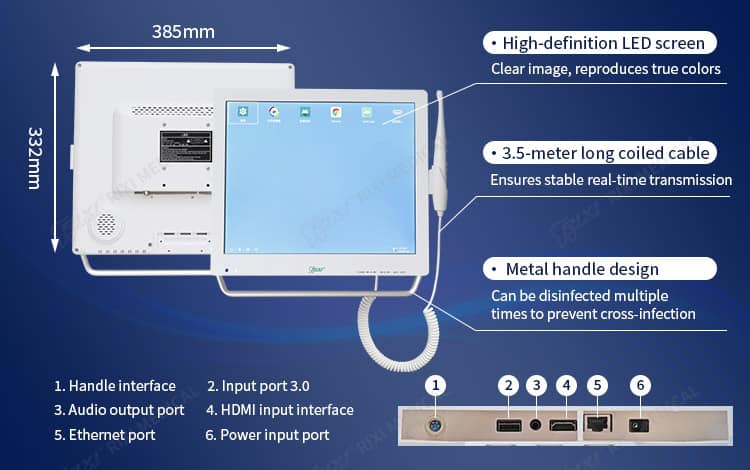
A camera should be reachable without pulling its cable across cabinet doors, instrument paths or moving equipment. For a monitor-based package, confirm the overall dimensions, viewing position, base or mounting arrangement, power outlet and clearance for service. If the system will be placed on a cart, verify stability, movement paths and cable restraint before approving the layout.
Cleaning guidance is model-specific. Ask which external surfaces, camera covers and accessories may be cleaned with the products used by the clinic, and which parts should not be immersed or exposed to liquid. The supplier should provide instructions for the exact configuration. Local infection-control procedures should be set by appropriately qualified personnel.
Documents and questions for the supplier
- What is the exact model reference, and what does the standard package include?
- Which component is wireless, and which power, receiver or display connections remain wired?
- Which operating systems, software versions or display inputs are supported?
- Can images be exported or stored, and what accessories are required?
- How are the handpiece, receiver and monitor identified for repeat orders or service?
- What are the approved cleaning, storage and charging instructions?
- Which parts can a distributor stock, and which repairs require supplier support?
- Which manuals, packing lists and technical drawings are supplied with the order?
These questions apply broadly, but the answers are model-specific. RIXI Medical is a dental equipment manufacturer and supplier based in Foshan, China; its current documents should be checked for the exact configuration being quoted. Buyers can use the wider intraoral imaging equipment category to understand adjacent options, then request written confirmation rather than relying on category labels.
Use a sample evaluation that purchasing can repeat
A distributor or multi-room clinic should evaluate a sample with a written acceptance sheet. Record package contents, physical condition, startup steps, connection stability in the intended environment, image display, controls, export method where applicable and shutdown or storage procedure. The evaluation should also note who performed each check and which functions were not tested.
For a wireless architecture, repeat connection checks after power cycling and after moving the unit within the intended room. For a monitor-based package, examine the viewing position, cable routing and whether the complete system can be cleaned and serviced without dismantling surrounding furniture. This is an equipment acceptance exercise, not a clinical performance claim.
Model-specific example: a camera with a 17-inch monitor
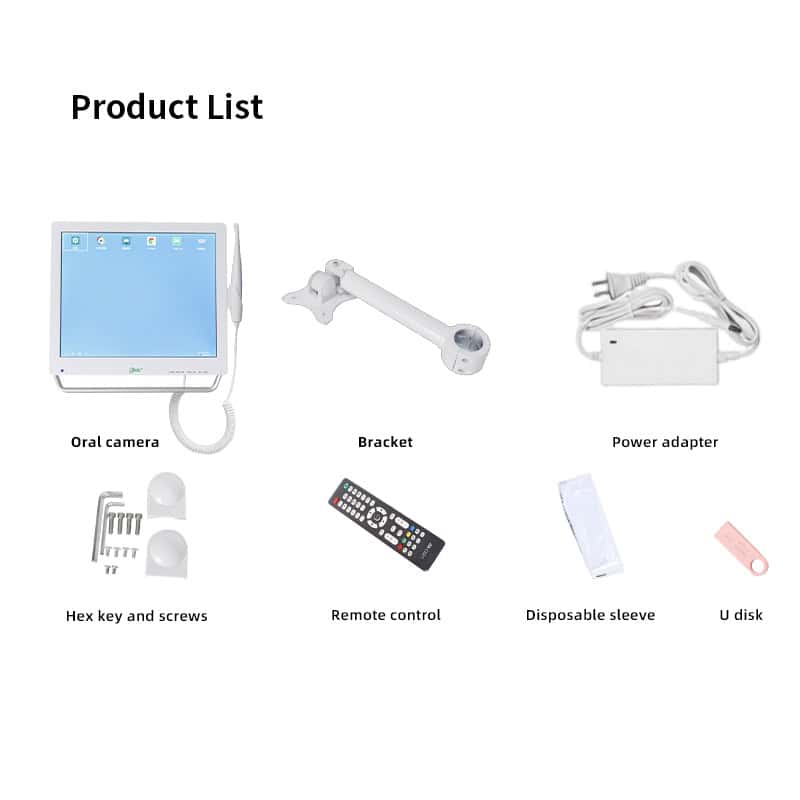
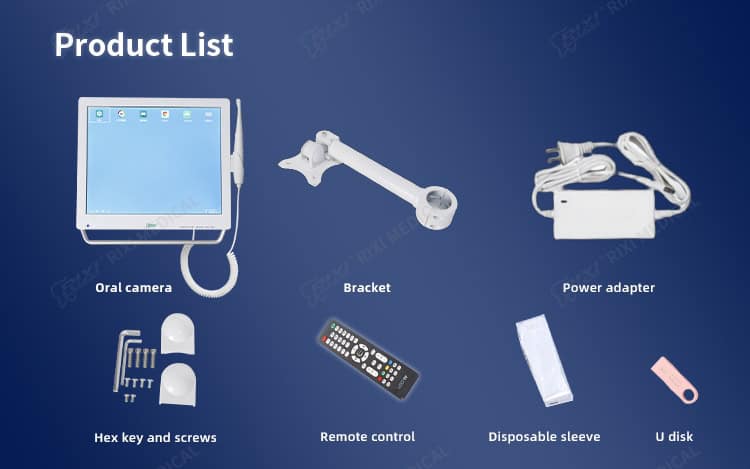
RIXI Medical lists a dental intraoral camera with a 17-inch monitor. Its published product page identifies a dedicated monitor, HD imaging and a four-screen display function. Those are model-specific details and should not be generalized to every oral camera. Buyers should confirm the current connection method, package contents, export functions and documentation with the supplier before ordering.
A distributor considering private-label supply should also separate product configuration from artwork approval. Packaging, manuals, labels and accessory lists need their own version control. The broader dental equipment catalogue can help build a complete offer, while technical questions should follow a defined supplier support route.
Frequently asked questions
Does “wireless dental camera” mean the system has no cables?
Not necessarily. The camera may transmit images wirelessly while still using a charging cable, receiver, monitor power cable or wired export connection. Request a complete connection diagram.
Is a dedicated monitor easier than a computer-based system?
It can reduce dependence on a workstation, but it still requires space, power and a plan for image handling. Ease of use depends on the clinic’s intended workflow and the exact model.
What should a distributor confirm before listing a camera?
Confirm the model, package contents, supported connections, software or display requirements, image export method, cleaning instructions, warranty process and first-line support responsibilities.
Can one camera be shared between operatories?
That depends on the physical package, connection method, charging or power needs, cleaning procedure and local workflow. Evaluate the proposed movement path and handover process before purchasing.
Reviewer scope note: Connectivity, software, accessories and cleaning instructions vary by model. Confirm exact specifications with the supplier and consult locally qualified IT, installation and clinical professionals where their input is required.
For a configuration review, request current specifications, package details or distributor information from RIXI Medical and describe the intended display, storage and integration workflow.
Need Dental Equipment Pricing or Configuration Details?
Contact RIXI Medical for model comparison, distributor pricing, packaging information, OEM/ODM requirements and after-sales support.
Request Product Information