A dental chair foot pedal can look simple while hiding several compatibility decisions. A replacement may fit the available floor space yet use a different control method, connector, hose arrangement or function map. For a clinic owner or distributor, ordering by appearance alone can lead to a pedal that cannot communicate with the chair—or that operates the wrong functions.
This guide explains how to specify a dental chair foot pedal as a spare part or as part of a new chair configuration. It addresses purchasing, installation coordination and acceptance testing. It does not replace the model manual, electrical diagram or guidance from a locally qualified service technician. Buyers comparing complete equipment can first review RIXI Medical’s dental chair range, then request the exact control documentation for the quoted model.
Start with the chair identity, not the pedal shape
The first purchasing record should identify the chair manufacturer, model, production reference and current configuration. Photograph the existing pedal from above and below, but also record the chair label and the point where the pedal cable or hoses enter the equipment. A visually similar accessory is not evidence of interchangeability.
If the chair has been modified, note that as well. A controller, delivery unit or wiring harness may have been replaced during service. The current connection can therefore differ from an older brochure. Ask the supplier to confirm compatibility against the serial or production reference and the latest configuration record, not just a marketing name.
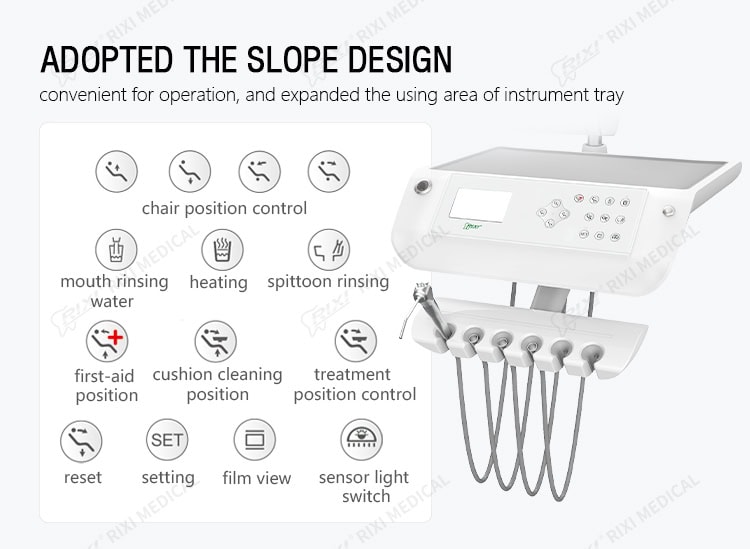
For buyers evaluating a new chair, compare how the pedal works alongside the dentist and assistant controls. The dental chair position-controls guide explains how to translate preset names into observable movements. The foot pedal specification should use the same function names as the chair quotation and handover checklist.
Identify the control method before discussing connectors
Foot controls can communicate through pneumatic lines, electrical conductors or a model-specific combination. Some primarily command chair movement; others may also control instruments or auxiliary functions. The precise arrangement is model-specific. Do not assume that the number of buttons or the outside housing reveals the internal method.
Request a supplier drawing or parts document that identifies the approved pedal assembly, cable or hose set and chair-side connection. If an electrical connection is involved, ask for the connector designation and pinout or wiring reference that a qualified technician can verify. If pneumatic lines are involved, request a labelled routing reference. Never use colour alone as the connection instruction.
| Compatibility item | Evidence to request | Why it matters |
|---|---|---|
| Chair identity | Model, production reference and configuration record | Limits the search to the correct control platform |
| Control method | Electrical, pneumatic or combined system description | Prevents a visually similar but incompatible selection |
| Connection | Connector ID, pinout, hose labels or assembly drawing | Supports safe installation and troubleshooting |
| Function map | Labelled diagram of every switch and direction | Allows the buyer to test the quoted functions |
| Cable or hose set | Length, exit direction, strain relief and included parts | Affects routing, trip risk and service access |
| Service part identity | Part number or revision tied to the chair | Improves repeat ordering and distributor support |
Write the required functions as testable actions
A quotation should state what each pedal action does on the selected configuration. Useful wording names the action and the result: press left to raise the chair, hold a control to move the backrest, or operate an instrument function only when the documented conditions are met. Avoid vague statements such as “multifunction pedal” unless the functions are listed.
Check whether an action is momentary, maintained or part of a preset sequence. Confirm whether the function is duplicated on another control panel and what happens when two controls are used. Any safety stop, enable condition or interlock claimed for the model should be described in the supplier documentation and included in acceptance testing without bypassing safeguards.

Plan cable routing, cleaning access and replacement work
The pedal sits in a demanding part of the operatory. Buyers should review the floor route, the distance to the chair connection and the way the cable or hoses are protected from pulling, crushing and repeated bending. Ask where strain relief is provided and whether the routing leaves access to chair service panels. The correct length is the one approved for the model and room layout; excessive slack can be as troublesome as a run that is too short.
Also ask for the manufacturer’s cleaning instructions and material restrictions. Do not infer chemical compatibility from the housing colour or texture. If liquid-ingress protection or another performance rating is claimed, request the supporting model-specific documentation rather than assuming all pedals in a product family share it.
Replacement should be coordinated with qualified service personnel. Before disconnecting anything, they should make the equipment safe according to the applicable documentation, label existing connections and record the original routing. RIXI Medical can provide supplier-side information for an ordered configuration, while installation and electrical work should follow local requirements and be performed by appropriately qualified people.
Compare the pedal within the full chair configuration
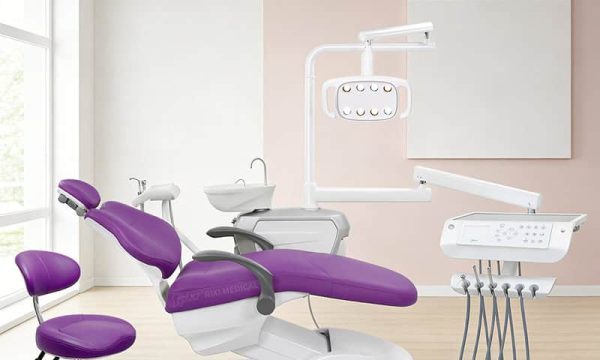
A foot control is one element of a system. When selecting a new unit, review it with the chair drive, instrument delivery controls, side box and service access. The R5 dental chair configuration, the R1 integrated dental chair and the R3 dental chair illustrate different complete-unit layouts; buyers must confirm the current specification supplied with any quotation.
For OEM/ODM or distributor orders, freeze the pedal assembly and control map in the approved sample. Record any revision in the bill of materials and technical file before production. Packaging should prevent the pedal, connector and cable from being bent or compressed in transit, and the carton list should make the accessory easy to identify during receiving.

Use a documented receiving and acceptance check
Test the pedal after installation using the supplier’s instructions and the agreed function list. Start with a visual inspection. Check the housing, underside, cable or hoses, connector, strain relief and packaging evidence. Confirm the part identity before connecting it.
- Match the pedal part or revision to the purchase record.
- Confirm that connectors, pins or hose labels match the approved documentation.
- Inspect the floor route and service-panel clearance.
- Operate each stated function separately and record the result.
- Verify direction, return behaviour and any documented enable condition.
- Check that controls return normally after release and that no connection is under tension.
- Retain photographs and the completed checklist for future spare-parts orders.
If a function behaves differently from the approved control map, stop the test and obtain supplier or qualified technician guidance. Do not swap conductors, pins or hoses by trial and error.
Procurement file to keep for future replacements
The most useful spare-parts record combines the chair model, pedal assembly reference, dated control diagram, connector or hose information, approved cable length, installation photographs and acceptance result. Distributors should link this record to the customer’s delivered configuration so the next replacement request does not begin with a photograph alone.
For general documentation and service coordination, review RIXI Medical’s technical support resources. To source a compatible foot control or approve an OEM/ODM configuration, use the equipment enquiry page to request the relevant specification, control drawing and parts reference.
Frequently asked questions
Are dental chair foot pedals universal?
No. Appearance does not confirm compatibility. Match the pedal to the chair model, control method, connector or hose arrangement, function map and approved parts reference.
What information should I send when requesting a replacement?
Provide the chair label, model and production reference, clear photographs of the existing pedal and connection, the current function map and any known service modifications. Do not send only a top-view photo.
Can a pedal with the same connector still be incompatible?
Yes. A connector can look identical while its pin assignment, signal logic or supported functions differ. Obtain the approved wiring or connection reference for the exact configuration.
Who should install and test a replacement foot control?
Use appropriately qualified service personnel following the chair manufacturer’s documentation and local requirements. Supplier information supports the work but does not replace site-specific safety procedures.
Scope note: This article provides general procurement guidance. Exact functions, connections, ratings and service procedures are model-specific; confirm them with the supplier and locally qualified professionals before purchase or installation.
Need Dental Equipment Pricing or Configuration Details?
Contact RIXI Medical for model comparison, distributor pricing, packaging information, OEM/ODM requirements and after-sales support.
Request Product Information